You already have the AI. Here’s the order.

A step-by-step system that takes you from
"I have an idea" to a working app you can test. All in plain English, so simple a sixth grader could set it up.

Built by a mom who needed this. Regular price $129 Founders price $77 once, yours to keep.

EXAMPLE
the build playbook
From "I have an idea"
to a working app you can test.
Your build
Phase 3 of 10
The UI and UX: 3 of 12 steps
Workspace13/13
The idea17/17
UI and UX3/12
Foundation0/17
Backend0/6
Frontend0/10
Testing0/11
Website0/6
Stores0/6
Launch0/6
Continue: The UI and UX →
You already pay for the intelligence

If you can type into ChatGPT, you have most of what you need.

Claude, ChatGPT, Gemini, Grok, Perplexity: the intelligence is already on your phone. What I was missing was the order. BUILD gives you:

I'm ready to buildJoin the waitlist · one email when it opens
Who it's for

If one of these sounds like you, you're in the right place.

You have an app idea and no tech background.

You know the problem because you live it. You just don't know what to do first.

You tried a vibe coding app and got stuck.

The screens looked great. Then nothing saved, or something broke, and you couldn't tell why.

You were about to pay someone $5,000.

Find out if your idea works first. If you still hire help, you'll walk in with most of it done.

You run a business and need a real website.

The website module works on its own: your logo, your pages, your own email address.

That's me. It's my turn.Join the waitlist · one email when it opens
What it cost me to learn

The most expensive way to build an app.

I did all three of these. Each one cost me weeks, money, or both.

  1. Start building before you decide where people will use it.

    A website and a phone app are built differently. Switching halfway means redoing work. Pick where it lives first.

  2. Let the AI build without a written plan.

    Every new chat forgets what the last one decided, so you keep explaining and rebuilding. A short instruction folder fixes that.

  3. Pay for more tools than you need.

    Most of what you need starts free, and you may already have the AI. Add tools when your app actually needs them.

I'm investing in meThe Build Playbook · Regular price $129 Founders price $77 once. Checkout opens soon

What it costs to find out if your idea can be real. Three ways.

Hire someone to build a first version$5,000+
Figure it out alone, like I did~$10,000
BUILD, with the AI you already pay forRegular price $129 Founders price $77

Hiring costs vary a lot. The $10,000 is about what I actually spent, in tools and mistakes.

What's inside

Here's what you get.

Real screens from the playbook. The example the whole way through is Lunchbox, a made-up lunch planner we build together.

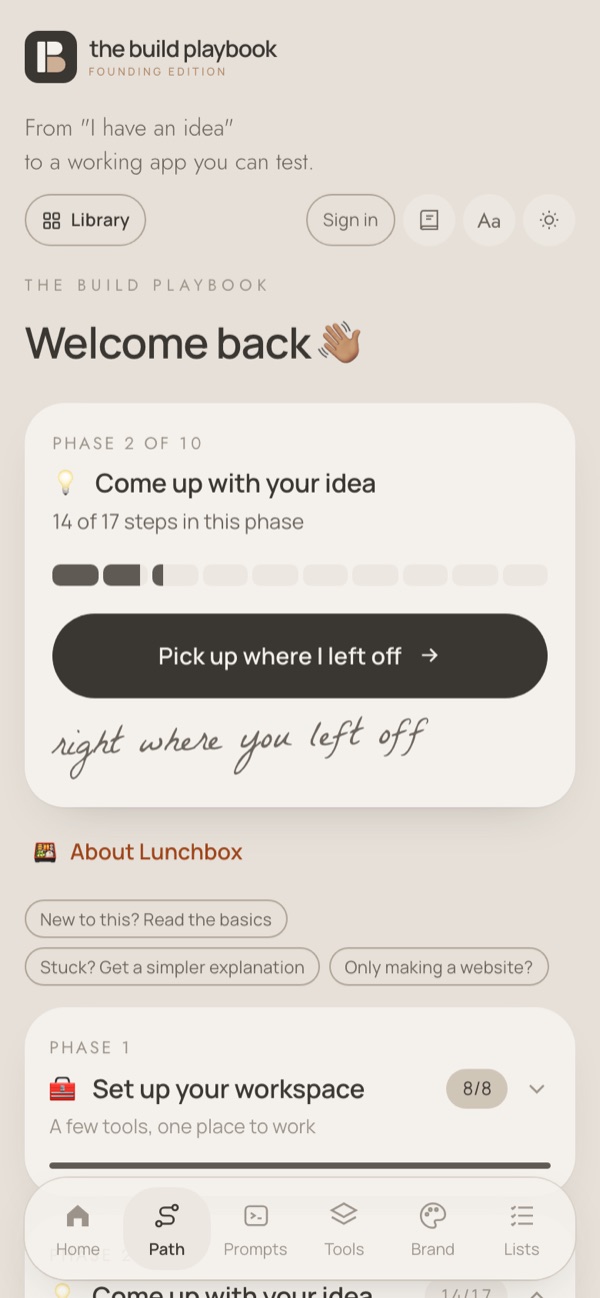
The path screen: Phase 2 of 10, Come up with your idea, 14 of 17 steps done, with a button that says Pick up where I left off

The path: 10 phases of small steps, in the order that saves you money. Check one off and the next one is waiting. Your progress waits for you, even if you only get twenty minutes a night.

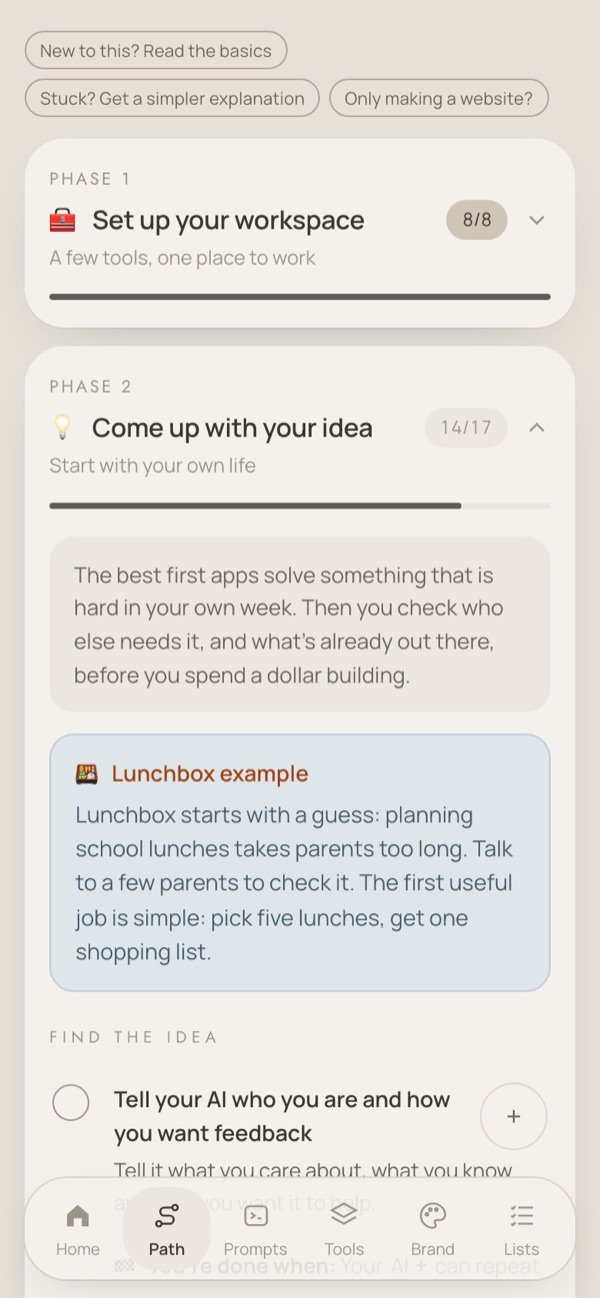
Inside a phase: a short note on why it matters, the Lunchbox example, and the first steps to check off

A real example, the whole way: every phase shows how Lunchbox would do it, so you see what good looks like before you try it yourself.

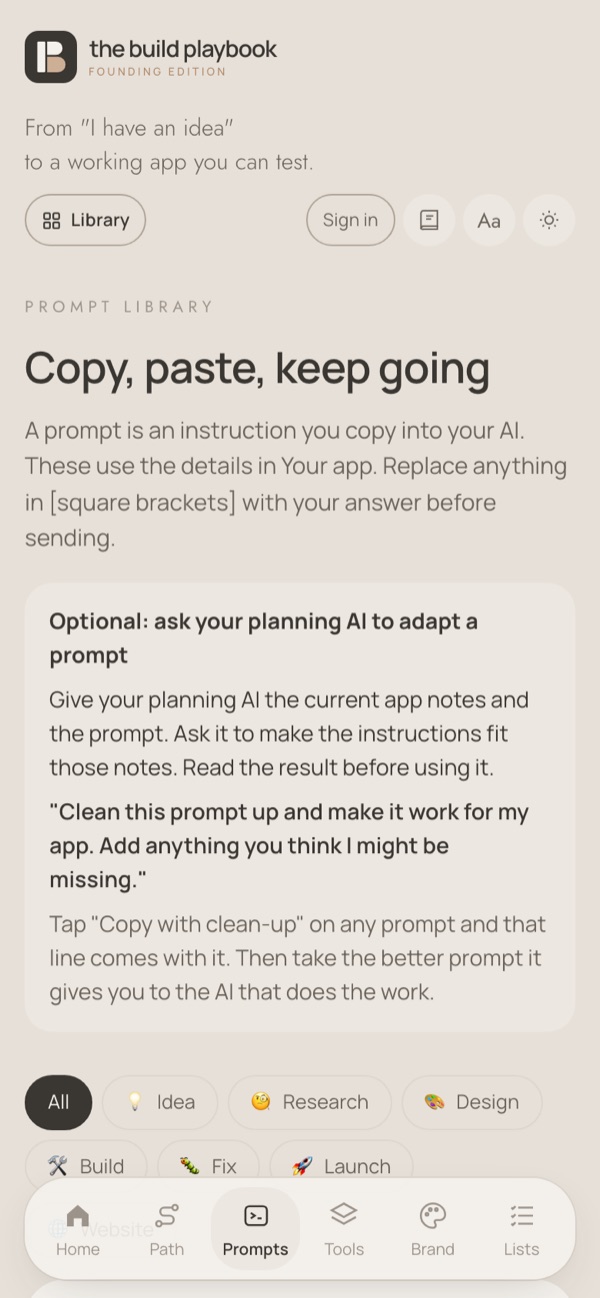
The prompt library: Copy, paste, keep going, with prompts sorted by idea, research, design, build, fix and launch

Prompts you copy and paste: type your app's name once. The prompts fill in your details, ready to paste into the AI you already use.

Four checklists: before you ask AI to build, before you invite people to test, before you send it to Apple, and before you share it with the world. If you can't check it, fix it first.

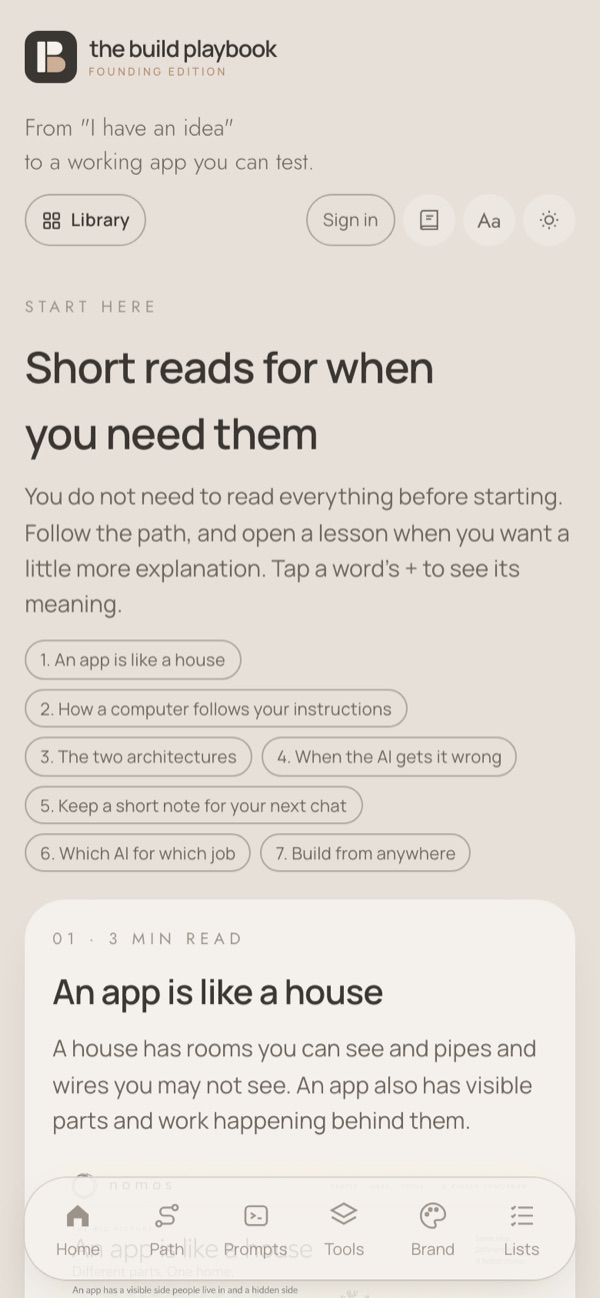
Start here: short reads like An app is like a house, The two architectures and When the AI gets it wrong

Plain-English reads: short lessons for when a word goes over your head. Tap any tech word to see what it means, with an everyday example.

My idea deserves thisOne email when it opens. No spam, ever.
What you pay for, honestly

Buy BUILD once. Bring your own tools.

BUILD is yours to keep. Use it for your first app, your second, and every one after that, for yourself or for other people. The tools you build with are separate, and most of them are free to start.

BUILD

One payment. Keep it. Use it again and again.

Regular price $129 Founders price $77once

Your tools

Your own accounts, in your name. I'll show you exactly how to set each one up.

  • A safe home for your codeEvery version saved
    Free
  • Your database and loginWhere your app keeps its information
    Free to start
  • Putting your app onlineSo people can actually use it
    Free to start
  • Crash reports and feedbackKnow what breaks and what people love
    Free to start
  • The tool where your app gets builtCursor or another one you like. Try a free plan first
    Free to try
  • Your two AI helpersTwo different ones, like ChatGPT and Claude. Start with what you have
    Use what you have
  • Polar, the AI browserBasically the engineer that lives in your browser
  • Apple or Google PlayOnly when you put your app on phones

Free plans are usually plenty until real people are using your app. Prices change, so the playbook keeps an up-to-date cost guide.

This isn't another course you have to finish

Keep it open beside your work.

No eight-hour video library. No jargon. You move through it one plain-English step at a time, on your own product, not while watching somebody else build theirs.

01

Check it off

10 phases, a few small steps in each, in the order that saves you money. Your progress waits for you.

02

Copy the prompt

Type your app's name once. Every prompt fills in your details, ready to paste into your AI.

03

Do the task

Then come back for the next one. Four checklists tell you when you're ready to move on.

Yes, I'm doing thisJoin the waitlist · one email when it opens
Why I made it

I made the expensive mistakes first.

I'm not technical. I don't have a college degree. I'm a mom who had ideas and no one to explain how any of this actually works.

I spent almost $10,000 and over 2,500 hours learning how to turn AI-generated screens into actual products. Vibe coding builds screens. It doesn't build a product.

I learned which tools are worth paying for, where AI gets you incredibly far, where it gets dangerous, what to set up on day one, and which mistakes cost hours or money to undo.

This is the system I wish somebody had handed me when I started. Every word of it was written for someone who doesn't already know what GitHub, a database or a deployment is.

Kassandra
Built by a mom

Why not us?

Tech shouldn't feel intimidating, especially now that AI can do so much of the heavy lifting.

The tech world doesn't look like the real world. A lot of the people building our apps have never worked a customer service line or helped someone through a hard problem face to face.

I did. For a decade I worked at the San Francisco Human Services Agency, helping people get through systems that weren't built with them in mind. That's how I build now.

We are builders too. Moms, caregivers, people who've worked real jobs with real people. We know the actual problems because we live them.

Our voices matter. So, why not us?

"I'm not promising you'll never need an engineer. I'm showing you how to get dramatically further before you pay one."And if you do hire one, you'll walk in with an app that's mostly done.

I'm changing my futureJoin the waitlist · one email when it opens
From my stack

Polar: the browser I build in.

Polar works across the tools I already use without losing the thread. It sets up accounts, connects services and does the busywork, so my time goes into the product. BUILD shows you exactly how I set mine up.

"It's the closest thing I've found to having an engineer living in my browser."Kassandra
Every buyer comes with me

I'm still building. You get what I learn.

If I find a better tool, a cheaper way to do something, a useful discount, a sharper prompt, or something I wish I'd known earlier, I add it. Every buyer gets every update to the core playbook free. No monthly fee. No paying again every time it gets better. Everything gets every add-on as it comes out.

New module

Just need a website? Build it yourself.

Already have a business? You don't need the app course. The website module works on its own: your logo, pages people actually google, email at your own domain, and getting found on Google and by AI.

Regular price $89 Founders price $53 on its own, or included with The Build Playbook.

See the website module →
Coming soonFree update for every buyer

More help getting your app onto phones

The playbook already has an App Store and Google Play phase. A deeper, click-by-click walk-through is on the way:

  • Apple Developer, App Store Connect and TestFlight, step by step
  • Google Play Console and Android testing, step by step
The Library

One home. More shelves on the way.

BUILD is the first playbook in a growing library. Same plain words, same checkmarks, one account, no subscription.

Visit Creators cornerNo dates promised. Everything gets every add-on as it comes out.
The offer

The whole system. Or just the website.

founders price with code FINDINGKASSANDRA

Founders price until December 31, 2026. Then the regular price.

The Build Playbook · The core
Regular price $129 Founders price $77one time

Buy once. Use it for every app you build.

  • 10 phases, step by step
  • Copyable prompts that use your app's details
  • My complete stack, and what it costs
  • Four launch gates
  • The two-architecture foundation, step by step
  • Every update to the core playbook, plus the website module
  • Start again from phase 1 for every new app or website
  • Use it for your own projects, or to build for family and clients
  • No subscription

One email when it opens. No spam, ever.

Any AI plans, Polar or building tool you choose are separate, in your own name, plus Apple ($99 a year) or Google Play ($25 once) when you ship to phones.

Website module · On its own
Regular price $89 Founders price $53one time

For businesses that just need a real website, built by you.

  • Your logo: use yours, clean it up, or make one, plus versions for merch
  • Pages that answer what people google
  • Email at your own domain, like hello@yourbusiness.com
  • Getting found on Google and by AI
  • Works on phones and computers, never weird on either

Want an app for your business too? The Build Playbook above includes this module, so it's the better deal.

Checkout opens soon

Plus your own domain and email (Migadu is $19 a year). Hosting is free to start. No subscription.

Build it together

Got a teen or a 7th grader? They can build it with you.

A website for your business, or an app just for them and their friends. Screen time that ends with something they made.

How to build with your teen →
FAQ

A few things people ask first.

When can I buy it?
Soon. I'm finishing the last checks so that paying and getting in work perfectly the first time. Join the waitlist and you'll get one email the moment it opens.
Is it a course or an app?
It's an interactive playbook you open in your browser: steps you check off, prompts you copy and checklists you run before each big moment. Your progress is saved. There's no video library to sit through.
Do I need to know how to code?
No. Every step is in plain English, written so simply a sixth grader could follow it. Every technical word is explained the first time it shows up. If you can copy, paste and follow a checklist, you can do this.
Can my teen use it?
Yes, together. It's written so a sixth grader can follow it. Most AI and building tools need you to be 13 or older, and some need 16 or 18, so younger kids build on a grown-up's accounts, with the grown-up doing the AI chats. If they make something for their friends, keep it private: invite-only, with a login, and no strangers. The website module shows you how.
Is it a subscription?
No. You pay Regular price $129 Founders price $77 once and keep it. Use it for as many apps as you want. It includes the website module and every update to the core playbook.
What else will I pay for?
Maybe nothing at first. Start with the AI accounts you already have. Paid AI plans, Polar and a building tool like Cursor are extras you add when they help. When you're ready to put your app on phones, Apple charges $99 a year and Google Play charges $25 once. Everything else starts free and is usually plenty for your first app or two. Inside, I show you exactly which tools I use and when it's worth upgrading.
Which AI do I need?
Any strong one works: ChatGPT, Claude, Gemini, Grok or Perplexity. Use two different ones: one to help with the work and one to check it for mistakes. Start with accounts you already have. You don't need paid plans to begin, and the playbook shows you when an upgrade is worth it.
What will I have at the end?
A working app you can put in front of real people and test, built on a foundation you understand. Not a pile of screens.
Can I use it more than once?
Yes, as many times as you like. When you're ready for your next app, website or idea, change your app's details and go through the path again from phase 1. Every prompt fills in for the new project.
Can I build websites or apps for other people?
Yes, and I hope you do. What you build belongs to you, or to the person you built it for. Build for family, friends or paying clients. The playbook itself is for you, so anyone you teach should get their own copy.
Will I ever need an engineer?
Maybe, and I'll tell you when. There's a checklist for exactly that. The goal is that when you do hire one, you're paying for a few hours of review, not a whole build.
Free guides

Questions I had when I started.

a kinder way to build

Your idea deserves a real try.

Start tonight, one step at a time.

I'm betting on me

The Build PlaybookRegular price $129 Founders price $77 once. Checkout opens soon

I'm in